






You know AI slop when you see it. Generic. Plausible. Subtly wrong.
As a consumer scrolling LinkedIn, it's entertaining. As a product manager, it's a computer-throw-worthy frustration, especially when that AI-generated PRD lands on a stakeholder’s desk before someone realizes it’s confidently describing a fake competitor. (We know YOU don’t do this, but you get the idea).
In product work, AI slop doesn't announce itself. The roadmap prioritizes features for a customer segment you don't sell to. The research summary collapses five nuanced interviews into "users want better performance."
It’s obviously not right. But if you read really fast it could, just maybe, be passable
That's what makes it dangerous. It wastes time. Erodes trust. Forces teams to debate outputs that feel real but aren't grounded in reality.
Good news: AI slop is a context problem you can fix.
The tool sprawl tax
Productboard’s recent State of AI report found that 88% of surveyed product managers use at least two LLMs and 60% use two prototyping tools in their daily work. But, we all know most tech stacks are bigger and messier than that.
PMs aren't chasing novelty. They're trying to find something they can trust. When AI outputs feel inconsistent, the instinct is to try a different tool. Maybe this model or that prototyping tool will perform this task better. But they’re still getting outputs that aren’t quite right for their company or product.
So they keep switching. Claude for strategy work, ChatGPT for brainstorming, Gemini for research synthesis. And so on. Different tools, different interfaces, same problem. The outputs feel generic. Plausible. Subtly off in ways that require hours of validation and refinement before anyone on the team will trust them.
The real cost shows up quietly. Hours spent re-prompting, validating outputs, refining drafts that were supposed to save time. Most of that never makes it to stakeholders, but the risk is always there. One hallucinated assumption can undermine credibility. So you over-review and over-polish.The result is a growing credibility tax where the time you saved upfront gets spent making sure nothing embarrassing ships.
Here's what that pattern is telling you: the problem isn't the tool. Yes, model quality matters. Different models have different strengths. But if you're getting the same type of wrong across every platform you try, the bottleneck isn't the model. It's the context.
Context is the accumulated knowledge of how your product and business actually work: who it's for, what problems it solves, what constraints matter, what decisions have already been made.
Without good context, every model is guessing. It's pattern-matching against millions of generic product documents, not your specific product. So it produces outputs that could work for anyone…which means they don't work specifically for you.
Enter: Context engineering
So what do you do? Enter: context engineering.
The term exploded mid-2025 after Shopify CEO Tobi Lütke tweeted: "I really like the term 'context engineering' over prompt engineering. It describes the core skill better: the art of providing all the context for the task to be plausibly solvable by the LLM."
The underlying concepts existed before—RAG systems were early forms of it—but the term gave a name to what practitioners were already discovering: that the quality of AI outputs depends less on clever prompts and more on the information architecture surrounding them.
Context engineering is making your product knowledge usable by supplying your AI tools with your:
- Product vision and strategy
- Real personas and customer feedback
- Competitive intelligence and market landscape
- Constraints, tradeoffs, and non-negotiables
- Active OKRs and what success looks like
- Past decisions and why they were made
Most teams already have this. Spread across Productboard, Notion, Confluence, Figma, Jira, approximately 47 Slack threads, and a Google Drive that's functionally a black hole.
Humans can piece that together on the fly… though not efficiently. AI can't, unless the context is curated.
How PMs are managing context now
Most teams approach AI context the hard way: recreating it fresh with every conversation, retyping the same product constraints, re-explaining the same user personas. It's exhausting.
The PMs getting reliable results may be writing better prompts, but more than likely they've developed a reusable system to supply their context.
But here's the catch: more context isn't always better. Dumping everything into every conversation overwhelms AI and buries relevant details. The key is understanding the spectrum of approaches—from fully manual to increasingly automated—and being strategic about which context matters for each task.
Level 1: Static files and prompt banks (manual application)
Many PMs store context in files they manually copy-paste or upload into AI tools when needed.
How PMs store context:
Plain text files (.txt, .md)
Simple, portable, and version-controllable. PMs keep a product-prompts.md file in their documents folder with sections like:
- User story generation templates
- Competitive analysis frameworks
- Feature prioritization prompts
- Product strategy documents
- User persona details
And so on.
Project context files
Some PMs working closely with engineering teams maintain context files that bridge product and technical work. These store product requirements, constraints, and current priorities that both PMs and AI tools can reference. An example and pervasive use case is Claude Code. Technical PMs use the CLAUDE.md file as persistent project context that Claude Code automatically loads. It's like onboarding documentation, but for AI.
A typical CLAUDE.md could include:
- Current product goals and success metrics
- Technical constraints from engineering (API limits, performance requirements, platform compatibility, coding requirements)
- User personas and key use cases
- Competitive analysis
- Strategic non-negotiables (e.g., "Must work offline," "Cannot require more than one login")
Here's an example of what that could look like at a high level:
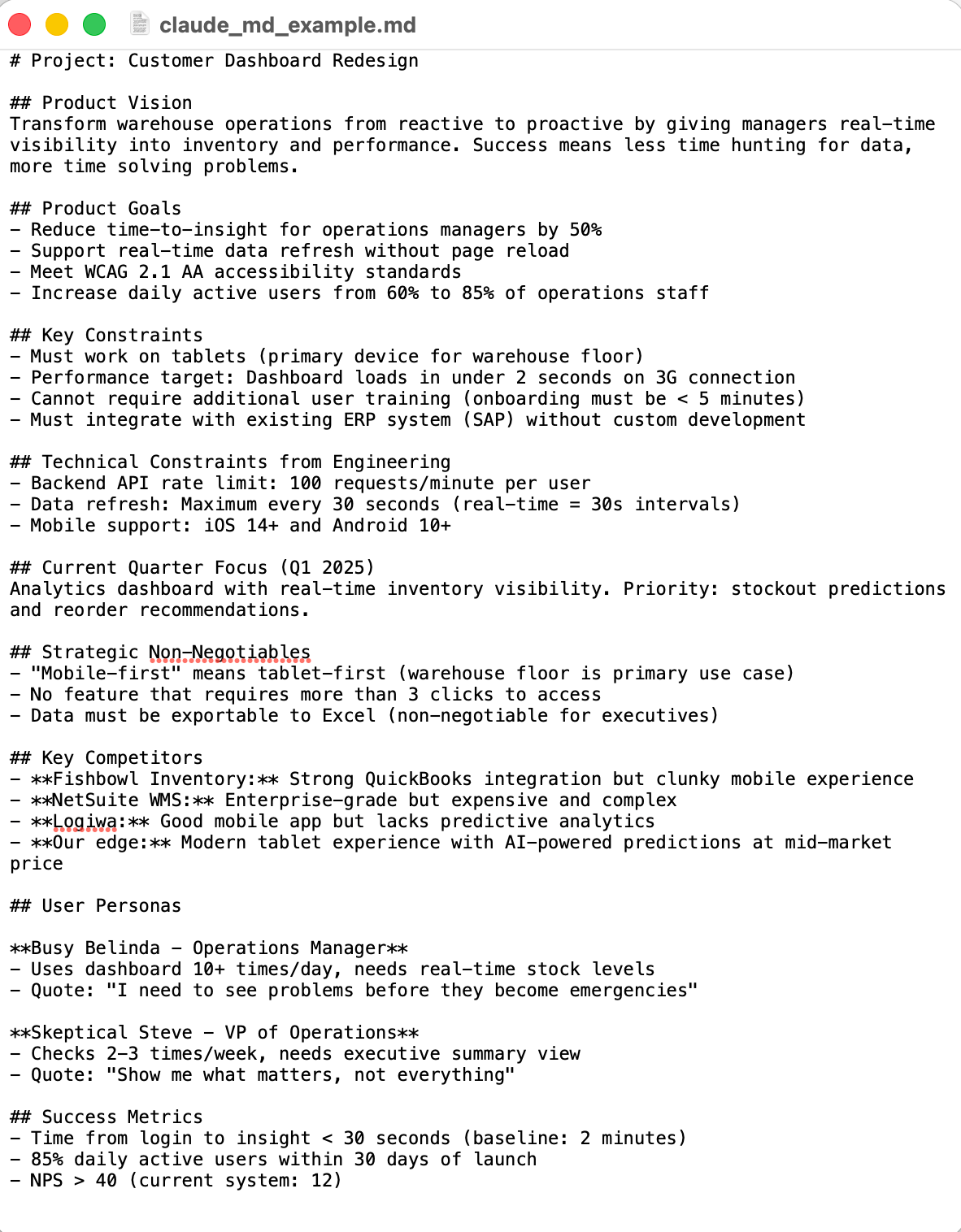
This becomes the foundation for AI-generated PRDs, user stories, and technical specs that actually align with both product vision and engineering reality.
Personal databases
Individual PMs often maintain their own workspaces with prompt collections organized by use case. Unlike team databases, these are personal libraries where PMs store prompts they've refined over time, categorized by workflow (research, writing, strategy, communication) with notes on what works best for different scenarios. Some examples include Obsidian vaults, Notion databases, or personal Google Docs––really any place a PM can categorize, store, and access their prompts and context easily.
How PMs apply context using static files and prompt banks
In this instance, before starting a task with an AI tool, a PM would open their context document, scan for relevant sections, copy them, and paste into the tool. For a technical question, they’d paste architecture constraints. For messaging work, they’d paste personas. For prioritization, they’d paste OKRs. And so on. Or, they’d upload the whole thing in a markdown file or other AI-friendly format.
The advantage: You have complete control over which context matters for each specific task, so nothing gets auto-applied that might confuse the AI.
The tradeoff: This approach is fully manual, which makes it easy to forget critical sections when moving fast. It's also hard to maintain consistency across a team when everyone's selecting slightly different context. When every PM maintains their own prompt library, context diverges. One PM's understanding of your ICP differs from another's, and new team members start from scratch.
The most mature teams solve this by centralizing their prompts and materials in shared repositories, ensuring everyone's using tested, consistent templates rather than reinventing the wheel.
Level 2: Shared repositories (centralized but still manual)
Teams who are actively changing and accelerating their product workflows often have team-wide prompt libraries and context documents that are stored in centralized locations. Everyone can access the same tested materials.
How product teams create shared repositories
Google Drive and SharePoint work well for simple sharing. One master document or spreadsheet, table of contents, organized sections by prompt type, folders where key strategic documents live. PMs copy-paste or download what they need.
Workspaces like Airtable, Monday.com, Clickup, Notion, etc. offer more sophistication. Teams build databases with categorization, tags, version history, and usage notes. Each entry includes the prompt template, required context inputs, links to documentation, sample output, common mistakes, and iteration history.
This creates institutional knowledge: your best prompts don't live in one PM's head; they're available to everyone.
How product teams apply shared repositories in their AI-product workflows
You use your team's shared repository as your home base. Your team has been enabled on where to find the right prompt templates, what to use them for, and which context documents to pair them with. When you need it, you copy it, switch back to your AI tool, and paste or upload. Everyone on the team has access to the same tested prompts and materials.
The advantage: This creates team-wide consistency, helps new PMs onboard quickly, and ensures best practices are captured and shared across the organization.
The tradeoff: Even with centralized libraries, you're still copying and pasting, which means you still have to remember where that perfect user research prompt lives then toggle between tools and tabs to reach your end goal. It breaks flow.
Text expanders can act as a stop gap.
Level 3: Text expanders (semi-automated insertion)
Text expanders are software tools that let users type a short abbreviation (like .userresearch) and automatically expand it into paragraphs of pre-written text. Instead of a PM navigating to their repository of choice, finding a prompt, copying, and pasting, they just type a shortcut and their product context appears instantly.
Popular text expander tools for PMs
TextExpander (Mac/Windows/iOS) - Create snippets with fill-in fields for variables.
Here’s what a saved snippet could look like. You type /userresearch and get:
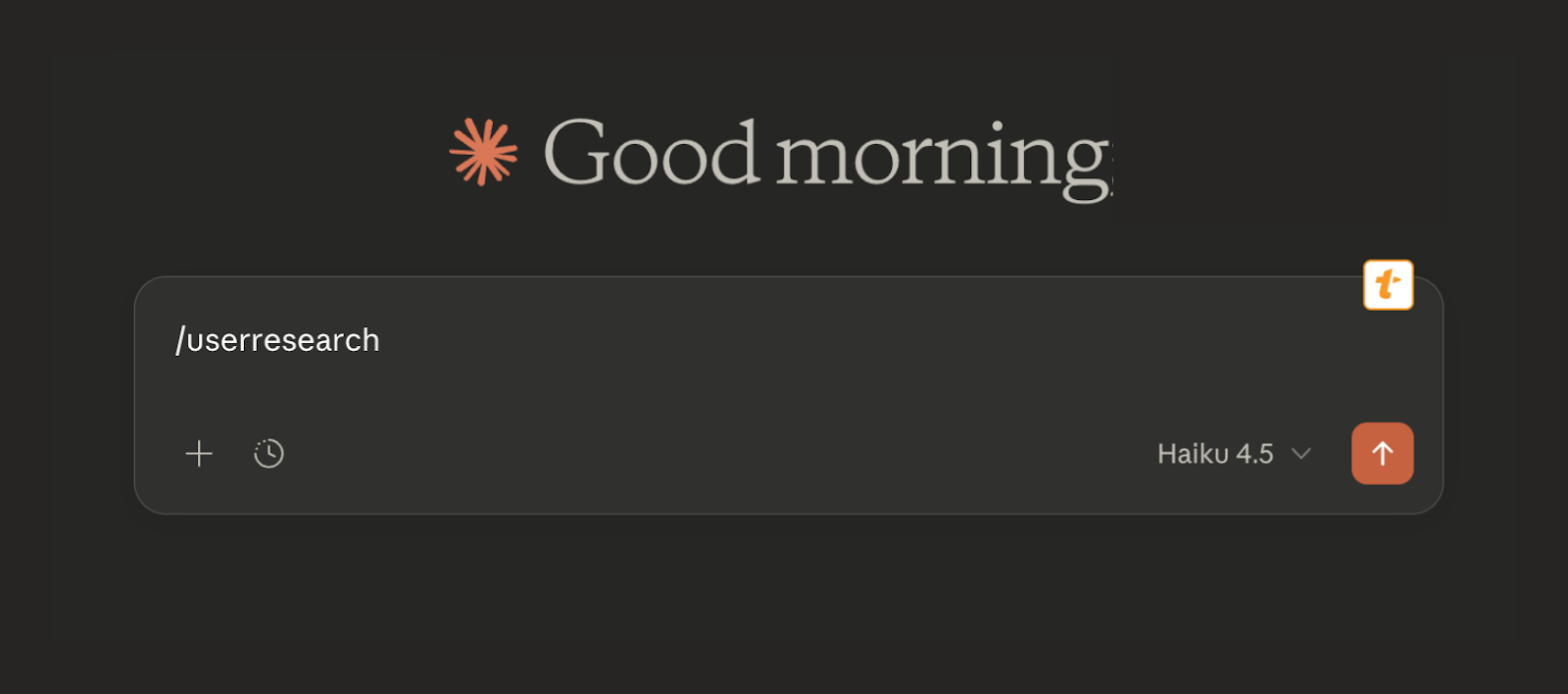
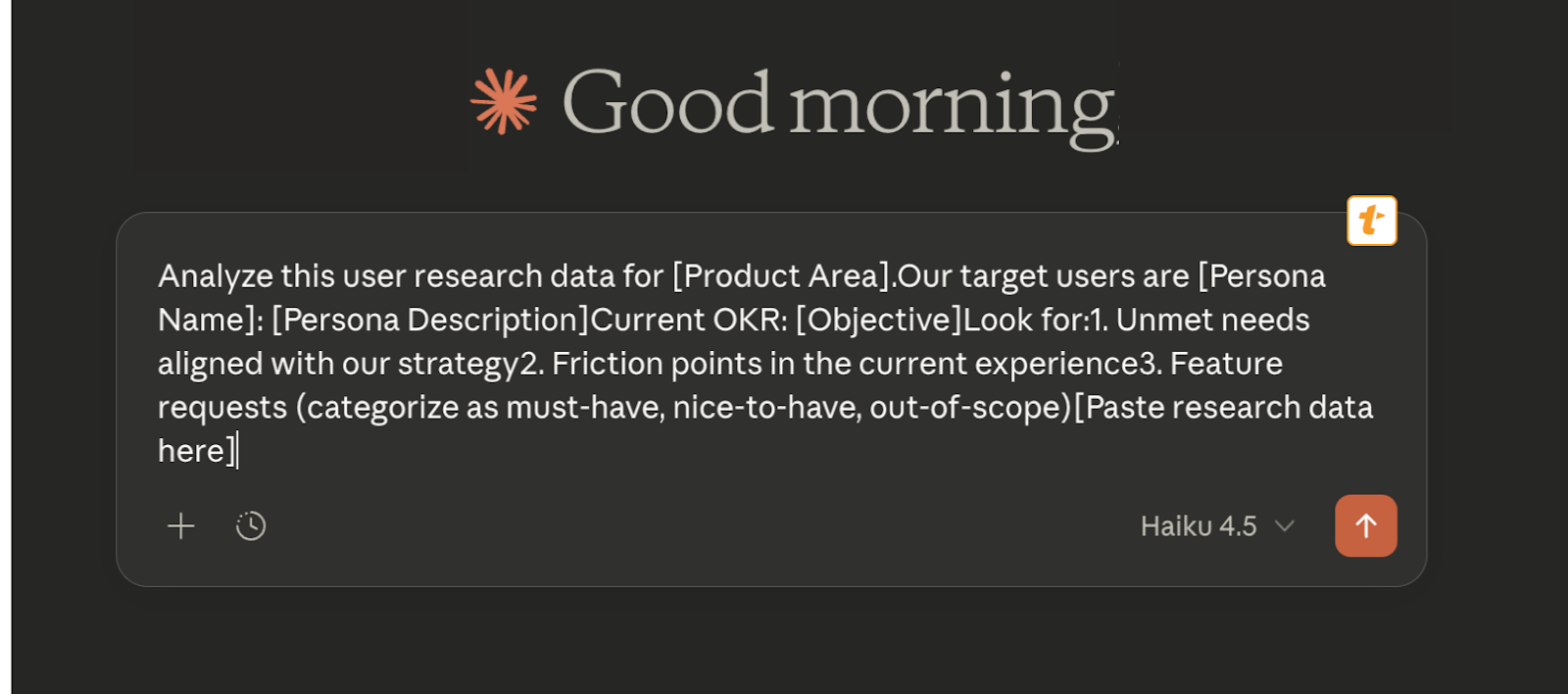
The bracketed fields prompt for input when expanded, making it easy to customize while keeping the structure consistent.
Raycast Snippets (Mac) offers lightning-fast, system-wide snippets. For example, type ;prd and a full PRD structure appears.
Browser extensions like Text Blaze work across all web-based AI tools. Create a /context snippet that auto-fills your product positioning, customer profile, priorities, and constraints (whether you're in ChatGPT, Claude.ai, or Gemini). Same context, every time.
How PMs use text expanders
Type your shortcut anywhere—in Claude, ChatGPT, Gemini, Slack, email—and your full context appears instantly. Fill in any variable fields, hit enter, and you're ready. That’’s it!
The advantage: Text expanders provide speed and work across every application, which eliminates navigation friction entirely.
The tradeoff: For individuals, it's another library to maintain. For teams, sharing and versioning snippets is manual work, which means each PM ends up with different variations, bringing back the consistency problems you were trying to solve.
But what if context could automatically apply without you typing anything at all?
Level 4: Project workspaces and dynamic connectors (persistent and live context)
If you're not using one of these already, you're probably hearing about them constantly from product leaders and influencers. Whether it's a project space in Claude or ChatGPT that remembers your context automatically, or Model Context Protocol (MCP) connectors that pull live data straight from source systems, the friction of manually loading context is disappearing bit by bit.
Project workspaces (persistent auto-loading)
Text expanders are fast, but you're still manually inserting context into every conversation. LLM project workspaces flip this: you set context once at the project level, and it automatically applies to every chat within that workspace.
These types of spaces exist in…
ChatGPT projects
Upload documents like your strategy deck, user research, and competitive landscape directly to the project. Set custom instructions that apply to every chat within that project. Start any conversation in your "Q4 Product Strategy" project, and ChatGPT already has your positioning, target users, and strategic pillars loaded without you doing anything.
Claude projects
Set project-level instructions and upload key documents that persist across all chats. Your project for "Mobile App Redesign" might have instructions like: "Users are busy ops managers who hate complexity. Always reference the uploaded research for pain points. Technical constraint: 3-second load time limit."
Example: A B2B SaaS PM creates a Claude Project called "Q1 Enterprise Features" and uploads:
- An ICP document with enterprise buyer personas
- Current roadmap and feature priorities
- Aggregated customer feedback
- A competitive analysis
- Technical constraints from engineering
- Custom instructions: "We're building for IT administrators at mid-market companies. Never suggest features requiring more than 2 hours of setup."
Every brainstorming session, PRD draft, or competitive analysis within this project incorporates this context automatically. No copy-pasting. No forgetting critical constraints.
How PMs apply context in LLM project spaces
You don't. That's the point. Open a conversation within your project workspace, and the context is already there.
The advantage: You set context once and use it many times, which dramatically improves consistency because everyone working in the same project uses the same context. There's no forgetting to paste technical constraints and no accidentally using outdated personas.
The tradeoff: It sounds simple, but for each new project you're re-uploading context, and the system doesn't stay "smart" as you scale your product work. Context is also locked within that AI platform—your Claude Project doesn't help when you're in ChatGPT. It's less flexible for one-off edge cases where you need to temporarily ignore a constraint.
MCP connectors (live, always-current context)
Projects are persistent, but they're still snapshots. You upload a strategy doc in November, and it stays frozen even when your strategy pivots in December. MCP solves this by connecting AI tools directly to your living, breathing source systems.
An MCP is a standardized interface that lets any AI application connect to any data source or tool through a common language. Instead of building custom integrations for each AI tool you use, MCP provides one protocol that works across platforms.
Open-sourced by Anthropic in late 2024, it's becoming the universal standard for connecting AI to external data.
How PMs Use MCPs in their product workflows
MCP servers act as bridges between AI tools and your data sources, giving models live access to:
- Resources: File-like data (API documentation, Google Drive files, database records)
- Tools: Functions the AI can call (create Jira ticket, query Notion database, fetch Slack conversations)
- Prompts: Predefined templates for specific tasks
Tools that are already using them include: Claude Desktop, Cursor, Replit, Sourcegraph, ChatGPT, Gemini, Codeium, and Productboard.
For example, A PM might implement an MCP by setting up the connectors for Google Drive, Notion, Slack, and GitHub. Then, they might ask Claude: "Based on our Q4 strategy and last week's user research, what should we prioritize next?"
Claude automatically:
- Fetches the strategy doc from Drive
- Pulls user research from Notion
- References recent product discussions from Slack
- Understands technical implementation from GitHub
- Synthesizes a recommendation with all context considered
No copy-pasting. No stale documents. The context is live, pulled directly from your source systems.
The advantage: Context is always current, which eliminates the copy-paste and upload workflows entirely. Your AI tools work with the actual source of truth, not stale copies, and it works across tools that support MCPs.
The tradeoff: MCPs requires some technical comfort to set up, and security considerations exist for enterprise data. Not every tool supports it yet, and each PM still configures their own connections, so there's no team-wide consistency guarantee. Furthermore, it can become resource intensive quickly, blowing through context windows and meaningfully degrading model output (a.k.a. context rot).
The path forward
The shift from "rebuild context every time" to "context engineering" is already happening. But there's a problem with the approaches we've covered. And it’s not just that…
- Text expanders and prompt banks require manual maintenance.
- Model Projects lock context into individual AI tools.
- Or that MCP connectors require technical setup and don't solve for shared team context.
It’s that all of this work to add context is on the PM. We’ve been talking about how PMs can make an AI tool work for them, but what's missing is a product built specifically for PMs.
Context shouldn't be something you recreate every time you use an LLM, or something each PM maintains separately.
That's why we built Productboard Spark, a purpose-built agentic product management platform currently in beta that treats context as a foundational feature. It helps teams turn scattered signals into clear product plans by guiding them through proven PM workflows and capturing shared product knowledge.
Making context part of your product tech stack with Productboard Spark
When you open Spark, you establish product context upfront: what you're building, who it's for, how it's positioned, what matters right now. No special formats.
You can connect through MCPs to pull context from your existing systems, integrate with Google Drive or Confluence, or go old school and copy-paste strategy from any existing document—giving you immediate access to your roadmap, personas, competitive battlecards, and more.
And in the near future, Productboard users will be able to connect directly to their Productboard instance for even deeper context from their validated customer feedback and product hierarchy.
That context becomes persistent and shared across every AI interaction. It's not locked in one PM's head or one tool's project space; it's available to your entire product team - no reuploading needed.
The advantages of Productboard spark
It’s inherently multiplayer: Unlike individual prompt banks or personal Projects, Spark's context is collaborative. When your product strategy shifts, one update refreshes the context for everyone. When a PM refines a persona based on new research, the whole team benefits. No more divergent context across team members leading to inconsistent AI outputs.
It leverages the best of your product knowledge: The platform synthesizes context from multiple sources (your product hierarchy, validated customer needs, competitive positioning, technical constraints, and more.) Instead of PMs manually compiling this into prompts every time they need something, Spark already has the full picture. For PMs already practicing context engineering, this eliminates the overhead. For those who haven't been consistently applying context—whether they didn't know how critical it was, couldn't find it, or didn't have time—Spark makes best practices automatic, closing the gap and accelerating their impact.
The principle is clear. Better AI outcomes don't come from more effort or better prompts. They come from removing the friction between the work product teams already do and the context AI needs to work well.
For product managers, context matters
The teams that figure out shared, maintained, platform-level context now will spend less time managing prompts and more time building products that impact their customers and their business. The teams that keep treating context as an individual PM's problem will keep fighting consistency issues, racing to speed up, and wasting time hunting down scattered documents—time that could be spent actually building or talking with customers.
If you want to see what it looks like when context is built into the product itself, learn more about Productboard Spark. We're working with teams in beta to explore how persistent, shared context changes AI-assisted product work. Come help us build.
Sponsored by:


Become a PLA Insider
Thank you for subscribing
Get exclusive insights, frameworks, and strategies from product leaders driving real business impact.
An email has been successfully sent to confirm your subscription.
 Follow us on LinkedIn