

AI isn’t “coming to” product work; it’s already in the room. Think writing specs, helping us sort feedback, even sketching UI copy. This means prompt engineering has quietly shifted from a quirky side skill to something every PM and developer should be reasonably good at.
When you learn to talk to models clearly, your product decisions get crisper. Your experiments run faster. And honestly, your team breathes just a little bit easier.
Whether you're designing AI-powered features, optimizing user experiences, or building internal tools, mastering the art of prompt engineering can dramatically improve your product outcomes.
What prompt engineering actually is (and why it changes outcomes)
Prompt engineering is the craft of telling an AI system exactly what you want. Think of it like working with a brilliant but literal teammate: if you’re vague, you’ll get something technically correct and practically meh. If you’re specific, you’ll unlock reasoning, structure, and surprising creativity you can ship.
For PMs, that means tighter specs, stronger user research synthesis, and better AI-powered features. For engineers, it means more stable integrations, fewer “why did it say that?” moments, and less time sanding rough edges off the output.
The core truth: result quality tracks prompt quality. “The sky is…” returns “blue.” Sure. “List the top three atmospheric scattering principles that make the sky appear blue, with one sentence each and a real-world analogy” gets you something you can actually use.
Prompt engineering is the cheapest and most efficient lever you have to improve the quality of your AI Products’ output.
 Rajesh Ranjan
Understanding the fundamentals
Basic shapes of a prompt
Most useful prompts include: a clear instruction or question, the context that narrows the universe, and sometimes examples or constraints.
- Question style: “What’s the most defensible way to prioritize features for our mobile app next quarter?”
- Instruction style: “Analyze last month’s NPS comments and identify the top three pain points, with one quote per pain point.”
Context is the multiplier
Context turns generic replies into actionable guidance.
- Without context: “Create a user story.”
- With context: “Create a user story for a mobile banking app that supports money transfers to family abroad; emphasize security and ease of use for non-technical users.”
A small digression: context isn’t only product details. It’s also about your constraints (timeline, team size), your business model, and what “good” looks like for you today.
Core techniques you'll use every day
1. Zero-shot prompting
Ask directly, no examples. Great for straightforward tasks where the AI can understand the request immediately.
Product Manager Example: Categorize this user feedback into feature requests, bugs, or general complaints: "The app crashes every time I try to upload a photo, and I really wish there was a dark mode option. Also, the customer support team never responds to my emails."
Developer Example: Write a Python function to validate email addresses and return True if valid, False if invalid, including proper error handling for edge cases.
2. Few-shot prompting
Few-shot prompts enable in-context learning, which is the ability of language models to learn tasks given a few demonstrations. This technique is particularly powerful when you need consistent formatting or specific analysis patterns.
It follows the method of ‘show-don't tell.’
Product Manager Example: Analyze customer feedback and provide insights in this format:
Customer: "The checkout process takes too long and requires too many steps."
Insight: Pain point identified in conversion funnel - checkout friction
Priority: High - directly impacts revenue
Recommendation: Implement one-click checkout option
----------------
Customer: "I love the new dashboard design, it's so much cleaner." Insight: Positive validation of recent UI redesign
Priority: Low - no action needed Recommendation: Continue current design direction
Customer: "The mobile app doesn't sync with the web version properly."
Insight: [Your analysis here] Priority: [Your assessment] Recommendation: [Your suggestion]
Developer Example: Create API documentation following this format:
Endpoint: POST /api/users
Description: Creates a new user account
Parameters: - email (string, required): User's email address - password (string, required): User's password Response: - 201: User created successfully - 400: Invalid input data - 409: Email already exists
Endpoint: GET /api/products/{id}
Description: Retrieves product information by ID
Parameters: - id (integer, required): Product ID Response: - 200: Product data returned - 404: Product not found
Endpoint: DELETE /api/orders/{id}
Description: [Complete this documentation]
3. Chain-of-thought prompting
This technique encourages the AI to show its reasoning process, leading to more accurate and trustworthy results. This is also helpful when you need explainable responses, and promotes the idea of Explainable AI.
Product Manager Example: I need to decide between two feature requests for our next sprint. Walk me through your reasoning process:
Feature A: Advanced search filters (requested by 45 users, estimated 2 weeks development)
Feature B: Push notifications (requested by 120 users, estimated 3 weeks development)
Consider: user impact, development effort, strategic alignment with our goal to increase user engagement, and resource constraints.
Developer Example: Debug this code step by step and explain your reasoning:
```python def calculate_discount(price, user_type): if user_type == "premium": discount = price * 0.2 elif user_type == "regular": discount = price * 0.1 return price - discount
The function should apply discounts, but users report getting errors. Walk through potential issues and solutions.
4. Role-based prompting
Assigning specific roles to the AI can dramatically improve the relevance and quality of responses.
Product Manager Example: Act as a senior product manager with 10 years of experience in SaaS products. Review this product requirements document and provide feedback on:
1. Missing requirements
2. Potential technical challenges
3. User experience concerns
4. Success metrics
[Insert PRD content here]
Developer Example: Act as a senior software architect reviewing a system design. Evaluate this microservices architecture proposal for scalability, maintainability, and potential bottlenecks:
[Insert architecture description here]
Provide specific recommendations for improvement and identify any anti-patterns.
Advanced techniques for product excellence
5. Constraint-based prompting
Adding specific constraints helps generate more focused and practical outputs.
When to Use:
- When you need outputs that fit within specific business, technical, or resource constraints.
- Ideal for brainstorming features, optimizing processes, or generating ideas under tight deadlines or limited resources.
Product Manager Example: Generate 5 feature ideas for our project management tool with these constraints:
- Must be implementable within 6 weeks
- Should require no additional third-party integrations
- Must address collaboration pain points
- Should not require significant UI changes
- Must be measurable with existing analytics
Developer Example: Optimize this database query with these constraints:
- Must maintain existing functionality
- Cannot add new indexes
- Should reduce execution time by at least 30%
- Must be compatible with PostgreSQL 12+
- Cannot change the API response format
[Insert query here]
6. Iterative refinement
Use follow-up prompts to refine and improve initial outputs.
When to Use:
- When the problem is complex or the output needs to evolve based on feedback.
- Best for developing personas, refining user stories, brainstorming new ideas or improving documentation.
Product Manager Example: Initial prompt: "Create a user persona for our fitness app"
Follow-up: "Make this persona more specific to busy professionals aged 28-40 who want to work out at home"
Further refinement: "Add specific pain points related to time management and motivation"
Best practices for product teams
1. Be specific and clear
Precise prompts eliminate ambiguity, ensuring the AI delivers actionable, relevant outputs. Vague instructions often yield generic or off-target responses, wasting time and requiring rework.
Before submitting a prompt, ask yourself: Would someone unfamiliar with my context understand exactly what I want? If not, add details or clarify your request.
Vague: "Improve our app."
Specific: "List three UX improvements that could reduce user onboarding time by 20%."
When working on a customer support chatbot, I found that asking for "ways to improve responses" led to generic suggestions. However, specifying "suggest three changes to reduce average response time by 30%" resulted in focused, actionable ideas.
2. Provide context
Context helps the AI understand your goals, constraints, and the environment in which the solution will be applied, leading to tailored and practical outputs.
Include business goals, user personas, technical limitations, and any relevant data in your prompt.
Without context: "Create a user story."
With context: "Create a user story for a mobile banking app focused on secure international transfers for users aged 25-40."
When developing a feature for freelancers, including details about their workflow and pain points in the prompt led to much more relevant feature ideas from the AI.
3. Use examples
Examples guide the AI toward the desired format and level of detail, reducing the need for manual editing.
To do this, provide a sample output or template with your prompt, especially for structured tasks.
Summarize customer feedback in this format: [Customer Quote] – [Insight] – [Priority] – [Recommendation]
For API documentation, sharing a model endpoint description ensured consistency across all generated docs.
4. Iterate and refine
The first AI output is rarely perfect. Iteration allows you to clarify, expand, or adjust the response to better fit your needs.
Treat prompts as a conversation – follow up with clarifications or requests for more detail.
Initial: "Create a user persona for our fitness app."
Follow-up: "Make this persona specific to busy professionals aged 28-40."
While building an onboarding flow, I iteratively refined prompts to get more nuanced personas, which directly improved our feature prioritization.
5. Validate and verify
AI can make plausible-sounding but incorrect suggestions. Validation ensures outputs are accurate and aligned with business goals.
Cross-check AI outputs with your own knowledge, team feedback, or real user data before implementation.
After generating feature ideas, review them for feasibility and alignment with your roadmap.
I once accepted an AI-generated feature suggestion without review, only to discover it conflicted with a critical compliance requirement. Now, I always validate outputs with stakeholders.
 John McMahon
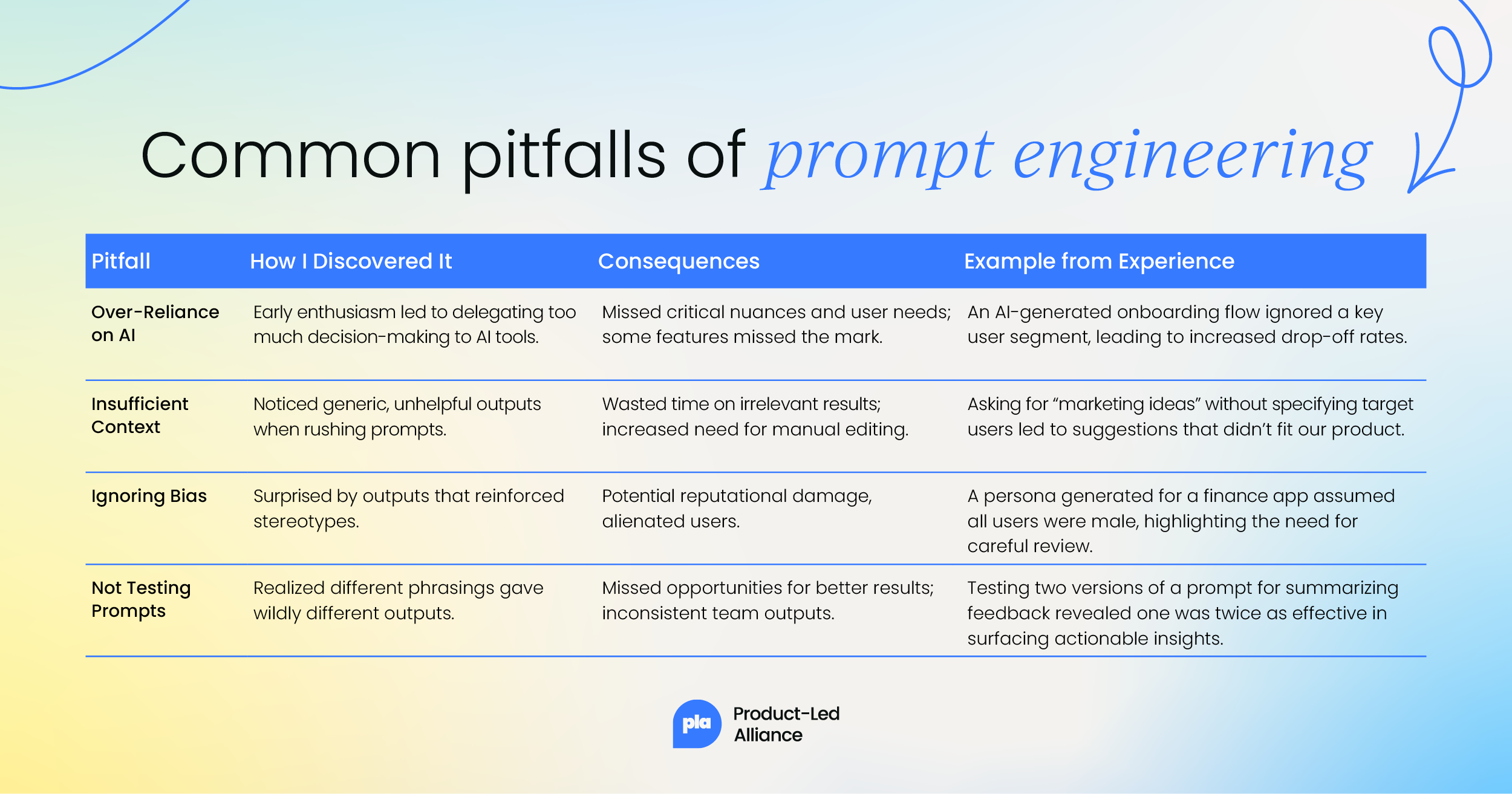
Common pitfalls: Discovery, consequences, and real-life examples
Measuring success
Track the effectiveness of your prompt engineering efforts by monitoring:
- Time saved in analysis and documentation tasks
- Quality improvements in AI-generated outputs
- Consistency in results across team members
- User satisfaction with AI-powered features
Conclusion
Prompt engineering is rapidly becoming an essential skill for product managers and developers working with AI. By mastering these techniques, you can unlock the full potential of AI tools, improve product development efficiency, and create better user experiences.
The key to success lies in understanding that prompt engineering is both an art and a science. It requires creativity in crafting prompts, analytical thinking in interpreting results, and iterative refinement to achieve optimal outcomes.
As AI continues to evolve, teams that master prompt engineering will have a significant competitive advantage in building innovative, user-centric products. Start practicing these techniques today, and you'll quickly see improvements in your AI interactions and product outcomes.
Remember: the best prompt is one that consistently delivers the results you need to make better product decisions.
Keep experimenting, refining, and pushing the boundaries of what's possible with AI-powered product development.


Become a PLA Insider
Thank you for subscribing
Get exclusive insights, frameworks, and strategies from product leaders driving real business impact.
An email has been successfully sent to confirm your subscription.
 Follow us on LinkedIn